

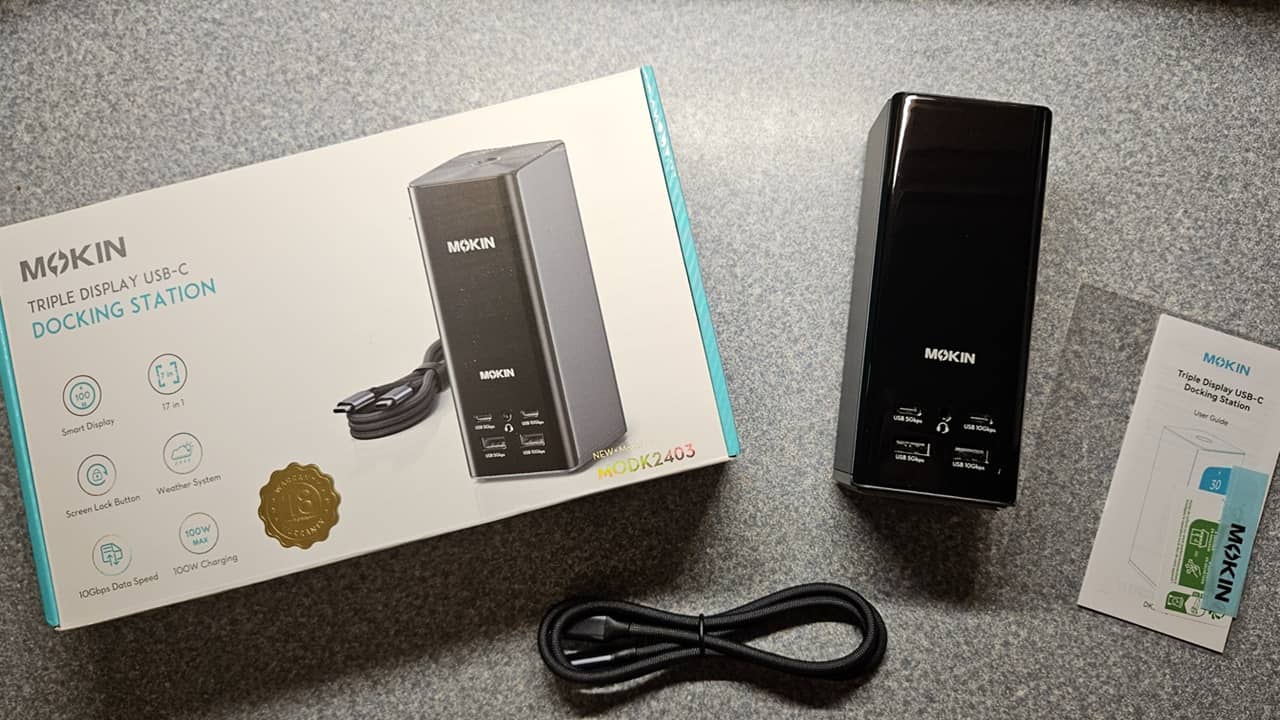
Many docking stations let you connect USB devices and possibly one external monitor. For those who want a major productivity boost with multiple screens, the MOKiN DockPro DK2403 Docking Station offers support for up to three displays, along with ample ports for all your other connections. This review shows how helpful it can be.
This is a sponsored article and was made possible by MOKiN. The actual contents and opinions are the sole views of the author, who maintains editorial independence even when a post is sponsored.
Elegant Design That Stays in Place
While my docking station doesn’t have to look great, it’s always a bonus when it does. The MOKiN DockPro DK2403 17-in-1 Docking Station has a steel gray body with a large black LCD screen in the front. It blends in well in most desktop setups.

I love that the majority of the ports are located on the back, as it means very few cables sticking out the front. Instead, the front is reserved mainly for USB drives or charging your phone.
But what surprised me more than the overall look was the base. Most good docking stations have rubber feet to keep them from moving around too easily. MOKiN goes a step further and has a silicone suction cup base. Use a tiny amount of pressure to engage the suction cup and ensure that the docking station isn’t going anywhere.

It’s a simple feature but removes the worry of the docking station falling over when you move your computer or monitor around.
The only complaint I had overall was the LCD display attracts dust and hair in seconds.
Expand Your Desktop With Three 4K Displays
Tired of jumping between apps and tabs constantly? The MOKiN DockPro DK2403 Docking Station solves this problem by supporting up to three 4K displays. A combination of three HDMI ports and two DisplayPort lets you connect displays however you need them. Just remember, despite having five ports for displays, only three external displays are visible at any one time.

Windows users get the most versatility here. Thanks to MST (multi-stream transport) support, Windows users can get the following display combinations:
- Mirror mode – all displays show the same screen
- Extended mirror – all external displays show the same screen, while the connected laptop shows a different screen
- MST – all displays show a different screen
Mac users only have mirror and extended mirror modes.
If you need privacy quickly, use the top button on the docking station to quickly turn off all connected screens. A quick double-press is all it took for all my screens to go dark instantly.

Connect Most Devices With Numerous Ports
The 17-in-1 docking station offers ample ports for most setups. I’m sure there are times when I may need yet another USB port, but that would be rare. The MOKiN DockPro DK2403 Docking Station features:

- 1 x USB-C 10Gbps
- 1 x USB-C 5 Gbps
- 1 x USB-A 10Gbps
- 1 x USB-A 5 Gbps
- Headphone jack
- USB-C host
- USB-C 100W power
- 3 x HDMI
- 2 x DisplayPort
- Ethernet
- SD reader and microSD reader
- 2 x USB-A 2.0
It’s also compatible with most host devices that support connection via USB-C, USB4, or Thunderbolt 3/4. I do suggest checking your laptop’s power port before buying to ensure it will be compatible.
Smart Display That’s Easy to Read
The large LCD display on the MOKiN DockPro DK2403 Docking Station shows the current status and connections in real time. Use the top button to switch between screens to show the status of individual displays, which ports are in use, the power consumption, and even the current weather.

For the weather, I just had to connect the MOKiN DockPro DK2403 to my Wi-Fi. It only takes a minute. If you need to switch between Celsius and Fahrenheit, open the Wi-Fi configuration settings and update the firmware. It’ll then let you choose between measurements based on your location.

Easy Setup for Use in Minutes
The product description says the MOKiN DockPro DK2403 Docking Station comes with two cables, but the package itself only shows one, and that’s what I received. Since you do have to connect the docking station to a power source, I do wish it came with a power adapter; I had to supply my own. MOKiN recommends a 100W or higher adapter to support full function.
Don’t worry. You won’t need any special drivers or software to use the docking station. It’s completely plug and play. Connect the cables, and you’re done.
There is a version that comes with a power adapter. The Pro Version includes the power adapter but requires driver installation. It also supports triple-display on both Windows and macOS but doesn’t include the weather display feature. If you already have a power adapter, it’s cheaper to stick with the standard version.
Once I dug out an extra USB-C power adapter, I was all set. I just connected the USB-C cable to the host power port and another USB-C cable to my laptop’s power port. I then connected my displays, my phone so that it could charge, a USB drive, and even a USB portable scanner. Even with everything connected, my laptop and phone charged quickly.

I also connected the docking station to Wi-Fi once it was connected to my laptop. I could then easily switch the display back and forth to view the weather.
Obviously, you’ll want to run the cables behind your monitor to hide clutter. I left everything out just to show all the various cables connected.

Connecting everything I needed took less than five minutes. The only difficult part was eventually running all my cables behind the monitor to make my desktop much less cluttered. That’s another area where this docking station excels: with everything connected in one place, it’s much easier to organize your desktop.
Upgrade Your Desktop

If you want to combine your connections in one place, get powerful charging, and even boost productivity with three extra displays, the MOKiN DockPro DK2403 has everything you need. While a power adapter would be a great addition to avoid any extra costs, that’s the only major downside. Upgrade your desktop setup today with the MOKiN DockPro DK2403 Docking Station for just $79.99.
