
Close Menu
Financblog
    What's Hot

    Worried about a lower Social Security benefit? How to calculate the exact impact it will have on your retirement.

    June 13, 2026

    SpaceX employees now have enough wealth on paper to buy every home in this Texas city

    June 13, 2026

    7.8 Million Student Loan Borrowers Are About to Deal With a New Debt Collector: The U.S. Treasury

    June 13, 2026
    Facebook X (Twitter) Instagram
    Financblog
    Facebook X (Twitter) Instagram
    • Home
    • Personal Finance
    • Passive Income
    • Saving Tips
    • Banking
    • Loans
    Financblog
    Home»Saving Tips»How Changing This Android Setting Lets Me Skip Most Annoying App Ads
    Saving Tips

    How Changing This Android Setting Lets Me Skip Most Annoying App Ads

    administraciónBy administraciónMarch 15, 2026No Comments4 Mins Read
    Facebook Twitter LinkedIn Telegram Pinterest Tumblr Reddit WhatsApp Email
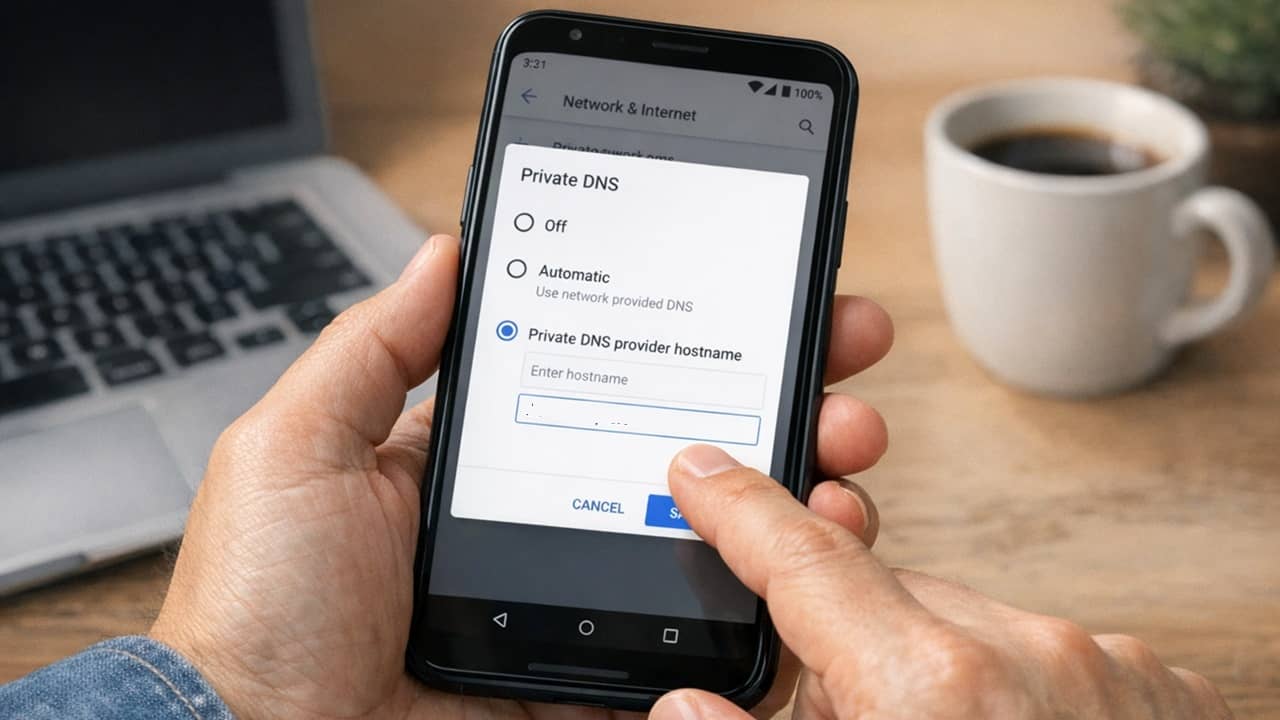
    Person setting up a private DNS on Android to block ads.
    Share
    Facebook Twitter LinkedIn Pinterest Email

    I love playing games on my Android phone, but some are so app-heavy, they’re impossible to enjoy. Instead of installing more app to block ads, I now use this one simple setting to block ads on Android.

    Why Avoid Third-Party Ad Blocking Apps

    I’ve tried apps to help block ads on games and sites on Android. The problem is apps often require me to root my device. Rooting isn’t difficult, but it may void your phone’s warranty. And, if you do it wrong, you could brick your device.

    The other issue is most of these apps require you to pay for the full features. And, many I’ve tried don’t do a great job at blocking ads overall. They might work for sites, but not apps or vice versa.

    I also value my privacy. Having a third-party app viewing everything I do doesn’t sit well with me. That’s why I turned to a simple, yet overlooked Android setting.

    Use a Private DNS Provider

    By default, Android uses the DNS (Domain Name System) provided by your mobile carrier or ISP. The default DNS doesn’t have any built-in ad filtering. You’re left to figure that out all on your own. Plus, your carrier doesn’t care if you spend the majority of your time waiting for ads to play.

    A private DNS lets you override the default settings and use a custom option with built-in ad filtering. No matter how you connect, whether is mobile data or Wi-Fi, you get to block ads on Android.

    Set Up Your Private DNS

    I’m using AdGuard DND for my example, but you do have other options. No matter what you choose to use, the steps are the same.

    On your Android device, go to Settings → Network & Internet → Private DNS. On Samsung (which I’m using), go to Settings → Connections → More Connection Settings → Private DNS.

    Viewing Connections on Samsung.
    View more connection options.
    Open Private DNS settings.

    The default is Automatic or Off. Select Private DNS provider and enter the address of your private DNS provider. In this case, I’m using dns.adguard-dns.com. Tap Save to make the switch.

    Setting private DNS provider.

    A few other options to use versus AdGuard DND, include:

    • Control ID – p2.freedns.controld.com
    • Mullvad DNS – adblock.doh.mullvad.net
    • Quad9 – dns.quad9.net

    Blocks Ads on Android, But Not Perfectly

    I want to be completely upfront. A private DNS on Android isn’t perfect. Even DNS providers that promise a 100 percent ad-free experience still let some ads leak through. Part of this is due to the types of ads sites and apps use.

    If the ad network or type isn’t on their block list, it’ll still pop up while you’re playing games or browsing. In that case, you can either try a different provider or just accept your life went from numerous ads to just a few.

    For me, I was thrilled to be able to play some of my favorite games without an app every few minutes. Yes, I had some games with that many ads.

    Issues With Ad Blocking on Android

    Some sites and apps you use may no longer work when you enable private DNS. If you see a message that you must disable your ad-blocker to continue, you’ll have to first go back to the Automatic or Off setting in the Private DNS settings to engage with that site or app.

    More and more sites and apps are doing this to protect ad revenue. I completely understand this. That’s why many apps and sites offer ad-free subscriptions. I highly encourage you to buy a subscription or donate to the site/app to help support development whenever possible.

    One other issue is public Wi-Fi. Sometimes, it’s impossible to log in to the public Wi-Fi network with private DNS enabled.

    I didn’t encounter too many issues when using private DNS myself. But, it can be cumbersome to keep changing the settings.

    Other Options for Blocking Ads

    If private DNS isn’t working right, or you hate going into your Android settings often, use an ad-blocking app on Android. These make it easy to quickly turn them on/off and whitelist certain sites/apps.

    Built-in ad blockers in some Android browsers work well for blocking ads on websites, but not apps. These also let you whitelist sites.

    One final option is to use an Android firewall with built-in ad-blocking and whitelists. This is a great way to also secure your device. Of course, there are multiple ways to secure your Android device beyond using a firewall.

    While I understand why apps and sites use ads, I often block ads on Android to further protect my device. This helps protect me from some forms of tracking and potentially malicious ads. But, if you want an across the board ad-blocking experience with no special apps needed, take advantage of private DNS.

    Ads Android Annoying App Changing Lets Setting Skip
    Share. Facebook Twitter Pinterest LinkedIn Tumblr Telegram Email
    Previous ArticleAfghan asylum-seeker dies in ICE custody, US advocacy group says
    Next Article The financial sector is sending some spooky technical signals about the stock market
    administración
    • Website

    Related Posts

    Russia still custom-builds the Soyuz return seats for ISS crew members using plaster casts taken weeks before launch, because astronauts grow as much as five centimetres taller during a long-duration stay and a seat moulded to their Earth-shaped spine would no longer fit the body that comes home

    June 12, 2026

    In 1843, Ada Lovelace described a brass-and-punched-card engine that could act on symbols as well as numbers, even composing music if harmony could be reduced to rules, inside seven translator’s notes three times longer than the paper itself

    June 10, 2026

    Octopuses possess roughly 500 million neurons distributed across their body, with two-thirds located in their arms rather than their central brain, meaning each arm can taste, problem-solve, and react to stimuli independently of whatever the octopus is otherwise paying attention to.

    June 10, 2026
    Add A Comment
    Leave A Reply Cancel Reply

    Top Posts

    Worried about a lower Social Security benefit? How to calculate the exact impact it will have on your retirement.

    June 13, 2026

    SpaceX employees now have enough wealth on paper to buy every home in this Texas city

    June 13, 2026

    7.8 Million Student Loan Borrowers Are About to Deal With a New Debt Collector: The U.S. Treasury

    June 13, 2026

    Subscribe to Updates

    Get the latest sports news from SportsSite about soccer, football and tennis.

    About Us

    Welcome to FinancBlog, your trusted online resource for personal finance insights, money management tips, and financial education designed to help you make smarter financial decisions.
    At FinancBlog, our mission is simple: to make personal finance easy, understandable, and accessible for everyone. Whether you are looking to save more money, understand banking products, explore loans, or build passive income streams, we provide well-researched and easy-to-read information to guide you.

    Facebook X (Twitter) Instagram Pinterest YouTube
    a1
    Top Insights

    Worried about a lower Social Security benefit? How to calculate the exact impact it will have on your retirement.

    June 13, 2026

    SpaceX employees now have enough wealth on paper to buy every home in this Texas city

    June 13, 2026

    7.8 Million Student Loan Borrowers Are About to Deal With a New Debt Collector: The U.S. Treasury

    June 13, 2026
    Get Informed

    Subscribe to Updates

    Get the latest creative news from FooBar about art, design and business.

    © 2026 inancblog.com. All rights reserved. Designed by DD.

    • About Us
    • Contact Us
    • Terms & Conditions
    • Privacy Policy
    • Disclaimer

    Type above and press Enter to search. Press Esc to cancel.

    Ad Blocker Enabled!
    Ad Blocker Enabled!
    Our website is made possible by displaying online advertisements to our visitors. Please support us by disabling your Ad Blocker.