Close Menu
Financblog
    What's Hot

    Anthropic’s Claude tops App Store charts as backlash builds against OpenAI’s ChatGPT

    March 2, 2026

    Bank of Japan deputy governor says rate hikes likely to continue

    March 2, 2026

    The whole world is watching this critical energy chokepoint as Iran conflict enters more dangerous phase

    March 2, 2026
    Facebook X (Twitter) Instagram
    Financblog
    Facebook X (Twitter) Instagram
    • Home
    • Personal Finance
    • Passive Income
    • Saving Tips
    • Banking
    • Loans
    Financblog
    Home»Saving Tips»This Time Saving Hack Adds a Restart Button to Your iPhone’s Lock Screen
    Saving Tips

    This Time Saving Hack Adds a Restart Button to Your iPhone’s Lock Screen

    adminBy adminFebruary 27, 2026No Comments3 Mins Read
    Facebook Twitter LinkedIn Telegram Pinterest Tumblr Reddit WhatsApp Email
    Add Restart Button Lock Screen Iphone Featured
    Share
    Facebook Twitter LinkedIn Pinterest Email

    Rebooting your phone once a week is a common recommendation among tech experts to help maintain performance and prevent minor glitches. Depending on how you use your device, you may find yourself rebooting even more often. If that’s your case, you should know there’s a way to make the process faster and more convenient. In this guide, we show you how to add a restart button to your iPhone’s lock screen for a smoother experience.

    Create a Shortcut for Restarting Your iPhone

    Currently, restarting (also known as soft reset) newer iPhones involves pressing the Side button together with one of the Volume buttons, then sliding your finger across the screen. Alternatively, you can restart the device by going through Settings. However, there’s a much better way to do this: adding a restart button on your iPhone lock screen.

    Note that if you’re dealing with more persistent or serious problems, knowing how to perform a hard reset can make all the difference.

    To add your restart button, you will first need to create a shortcut using the Shortcuts app.

    Open the app and tap on the + button in the upper-right corner.

    Tapping

    Tap on the Search Actions bar at the bottom and look for Shut Down. Tap to add it to your shortcut.

    Tapping on
    Selecting

    Once the action is added, tap on the Shut Down option in blue and switch to Restart.

    Switching from

    Next, tap on the name of the shortcut at the top and select Rename to give your shortcut a proper name.

    Tapping on shortcut name in Shortcuts app on iPhone.
    Viewing shortcut menu in Shortcuts app on iPhone.

    From the same menu, tap on Choose Icon. Select a color and icon for your shortcut, and then go back to the shortcut screen.

    Selecting icon for shortcut in Shortcut app on iPhone.

    Finally, tap on Add to Home Screen. This adds a shortcut on your home screen, so you can easily restart your device even when your phone is unlocked. The home screen shortcut will display the same icon you’ve previously set.

    Add the Shortcut to the iPhone’s Lock Screen

    Once you have the shortcut, the next step is to add it to your iPhone’s lock screen. To do so, wake up your phone. Long-press on your lock screen until the Customize button appears at the bottom. Tap on the Add Widgets option.

    Tapping on
    Add Restart Button Lock Screen iPhone Add Widgets

    By the way, you can now move your widget bar to the bottom if you so desire. Learn more about how to overhaul your iPhone lock screen here.

    Select Shortcuts from the list. Tap on the widget option to add it to your lock screen.

    Selecting
    Screenshot
    Selecting

    Once the widget has appeared on the lock screen, tap it twice to select the shortcut you wish to run. Select the one you’ve created in the previous step.

    Selecting shortcut to run via lock screen widget on iPhone.
    Add Restart Button Lock Screen iPhone Shortcut View

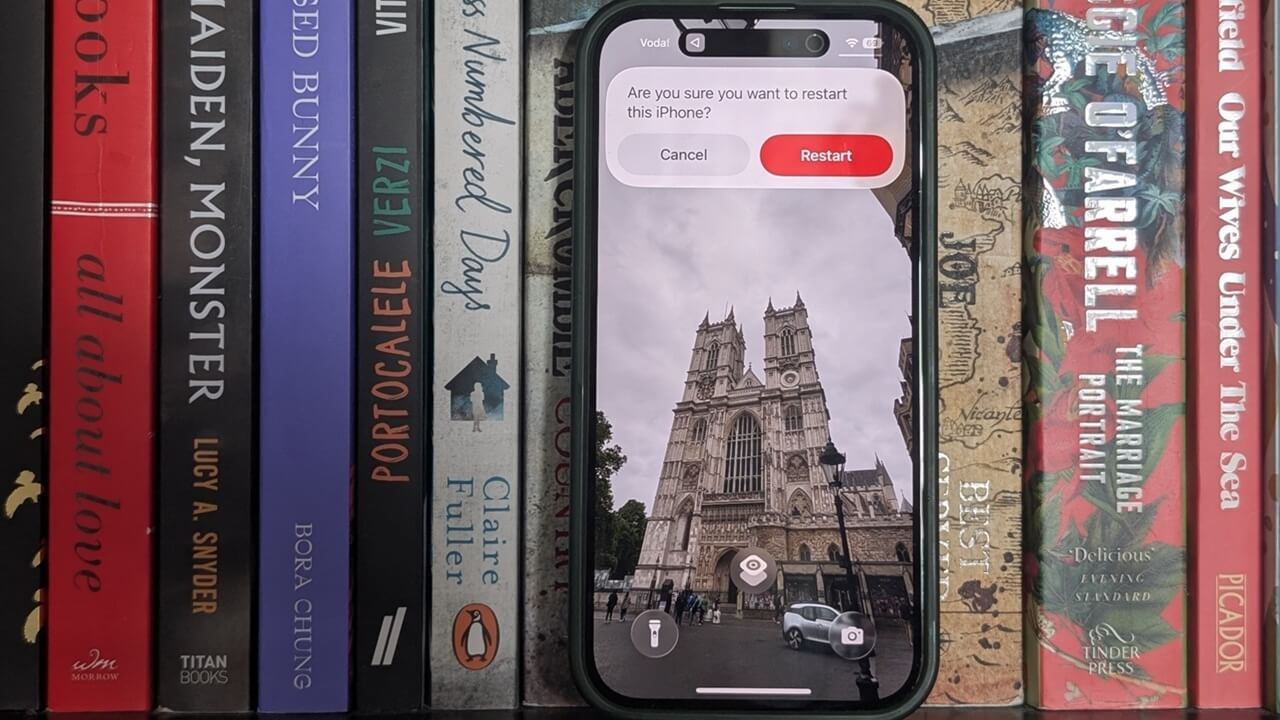
    The widget should be visible on your lock screen. If you press it, a pop-up will appear asking you whether you want to reboot. Tap Restart to confirm. That’s it.

    View of pop-up asking whether you'd like to restar iPhone.

    To make your lock screen more powerful, take a look at these practical lock screen widget options for your iPhone.

    Adds Button Hack iPhones Lock Restart Saving Screen Time
    Share. Facebook Twitter Pinterest LinkedIn Tumblr Telegram Email
    Previous ArticleNeed a side hustle to support your retirement dreams? Here’s how to find work right now.
    Next Article BlackRock TCP Q4 2025 slides highlight challenges amid portfolio stress
    admin
    • Website

    Related Posts

    How to Move Your WhatsApp Stickers to iMessage

    February 28, 2026

    Mortgage rates fall below 6% for the first time since 2022, giving buyers a glimpse of affordability

    February 28, 2026

    DoNotNotify Lets You Block Android Notifications Without Disabling Everything

    February 28, 2026
    Add A Comment
    Leave A Reply Cancel Reply

    Top Posts

    Anthropic’s Claude tops App Store charts as backlash builds against OpenAI’s ChatGPT

    March 2, 2026

    Bank of Japan deputy governor says rate hikes likely to continue

    March 2, 2026

    The whole world is watching this critical energy chokepoint as Iran conflict enters more dangerous phase

    March 2, 2026

    Subscribe to Updates

    Get the latest sports news from SportsSite about soccer, football and tennis.

    About Us

    Welcome to FinancBlog, your trusted online resource for personal finance insights, money management tips, and financial education designed to help you make smarter financial decisions.
    At FinancBlog, our mission is simple: to make personal finance easy, understandable, and accessible for everyone. Whether you are looking to save more money, understand banking products, explore loans, or build passive income streams, we provide well-researched and easy-to-read information to guide you.

    Facebook X (Twitter) Instagram Pinterest YouTube
    a1
    Top Insights

    Anthropic’s Claude tops App Store charts as backlash builds against OpenAI’s ChatGPT

    March 2, 2026

    Bank of Japan deputy governor says rate hikes likely to continue

    March 2, 2026

    The whole world is watching this critical energy chokepoint as Iran conflict enters more dangerous phase

    March 2, 2026
    Get Informed

    Subscribe to Updates

    Get the latest creative news from FooBar about art, design and business.

    © 2026 inancblog.com. All rights reserved. Designed by DD.

    • About Us
    • Contact Us
    • Terms & Conditions
    • Privacy Policy
    • Disclaimer

    Type above and press Enter to search. Press Esc to cancel.

    Ad Blocker Enabled!
    Ad Blocker Enabled!
    Our website is made possible by displaying online advertisements to our visitors. Please support us by disabling your Ad Blocker.