


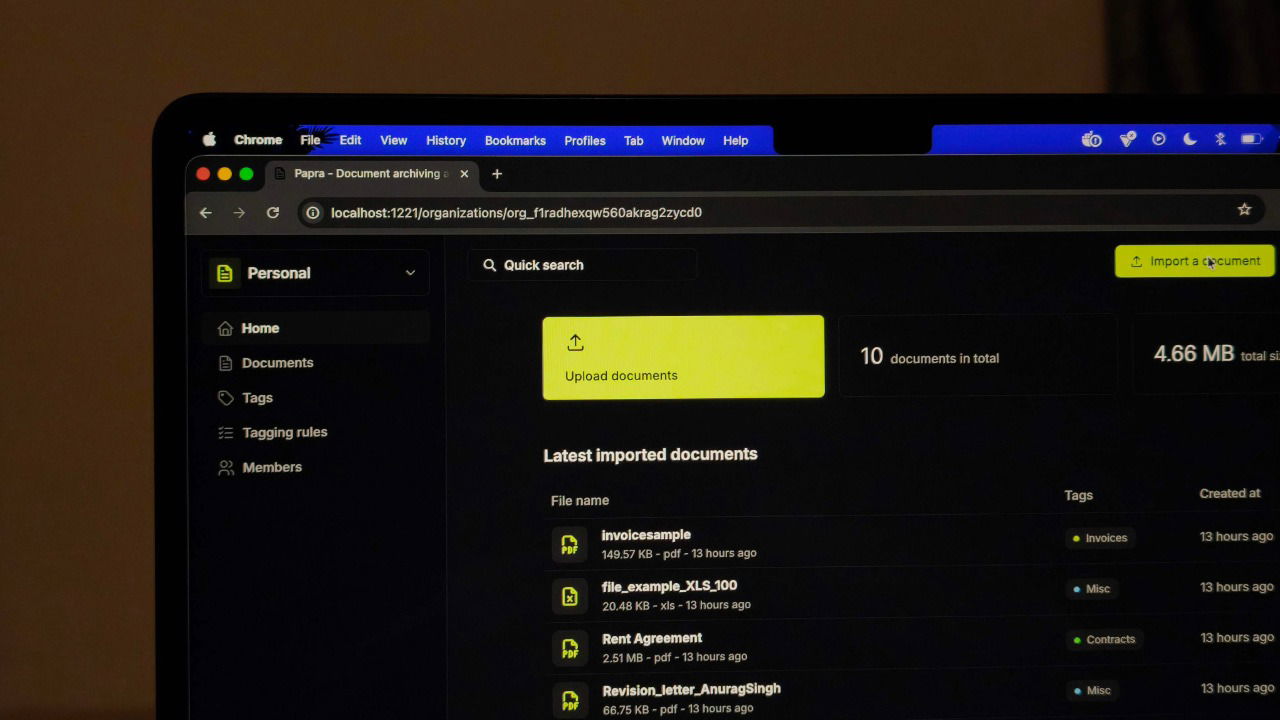
Google Drive is built for storing everything, including photos, videos, audio, and files, not just documents. That flexibility has its advantages, but document management isn’t really its strong point. While it’s convenient, finding things has never been easy, especially when you just want to find something quickly. I recently discovered a dedicated document management tool called Papra that solves exactly this.
Why Papra is the Best Document Management App
Papra is an open-source, self-hosted app built around collecting, organizing, and retrieving documents with minimal manual work. You can upload documents directly, import automatically from a watched folder, or have them ingested by forwarding emails to a generated address. Once added, Papra extracts text from PDFs, images, and scanned files, making every document searchable.
Organization is handled through tags rather than rigid folder hierarchies. You can apply tags manually or automatically using tagging rules, which classify documents based on predefined conditions. I have found this feature to be quite useful when organizing large collections.

Papra supports multiple users and organizations, which means documents can be shared and managed across families, teams, or small businesses. User accounts and authentication are built in, and the interface works across desktop and mobile devices, with optional dark mode.
For automation and integration, Papra exposes an API, SDKs, webhooks, and a command-line interface. You can use these tools to build custom workflows, integrate Papra into existing systems, or manage documents without using the web interface. There’s also internationalization support that allows the interface to be used in multiple languages.
Setting Up Papra
If you are already using Docker Desktop, setting up Papra is simple and does not require the terminal at all. Open the Docker Desktop app and select Docker Hub from the side panel.
In the search bar, look for Papra and choose corentinth/papra from the results. Open the image, click Run, give the container a name, and start it. Docker Desktop automatically selects the required port, so there is nothing else to configure.

Once the container is running, open your browser and head to http://localhost:1221 to access the Papra interface and create your account.
This is the easiest way to get Papra running and works well for both local use and long-term setups without any extra configuration.
For those who prefer Docker CLI
If you want more control over how Papra runs and are comfortable using the terminal, you can install it using Docker Compose. First, make sure Docker is installed on your system.
Start by creating the required directory structure using the command below:
mkdir -p papra/app-data/{db,documents} && cd papraThis creates the main “papra” folder, “papra/app-data/db” for database files, and “papra/app-data/documents” for uploaded documents. It also moves you into the papra directory.
Next, generate a secure secret. This key is used to encrypt authentication tokens and session data. Without it, Papra won’t start in production mode.
openssl rand -base64 32Once that’s done, create a Docker Compose file that tells Docker how to run the Papra container. Use the command below to open the nano text editor and create a new file called “docker-compose.yml” in the current directory:
nano docker-compose.ymlPaste the following content into the file, replacing YOUR_SECRET_HERE with the secret you generated earlier:
services:
  papra:
    container_name: papra
    image: ghcr.io/papra-hq/papra:latest
    restart: unless-stopped
    ports:
      - "1221:1221"
    volumes:
      - ./app-data:/app/app-data
    environment:
      - AUTH_SECRET=YOUR_SECRET_HERE
That’s it. Run
docker-compose up -dto start the container. You can then open http://localhost:1221 to access the GUI and create a new account.
Using Papra to Manage Documents
Once you log in, you’re greeted with a clean and uncluttered interface. The main screen shows recent documents and organizations, and you can upload new documents by dragging files onto the page or clicking the Upload button. Papra accepts PDFs, images, and the most common document formats.

When you open a document, you are able to see details like its name, when it was added or updated, and the tags it belongs to. On the right, you also have a viewer that lets you see the document and copy text if you want to. Each document gets automatic text extraction. Even scanned PDFs and images go through OCR to make the content searchable. This happens in the background without manual processing, and it’s super quick.

You can use tags to organize documents instead of folders, and you can add multiple tags to each document. For example, you can add health and insurance tags to medical records, while finance and taxes tags can be used for tax documents.

The tagging system also supports automatic rules. You can create a rule that tags any document containing specific keywords. For instance, you can add a rule to automatically add a ‘shopping’ tag to all invoices with Amazon in the text. These rules run on new uploads without manual tagging.

Papra includes an organization feature that lets you keep household and work files isolated from each other. You can create a family organization for personal records and a separate work organization for business files, with each organization having its own members and permissions, so documents remain invisible outside their assigned group.
Once documents are separated this way, Papra offers multiple ways to get files into the system without relying on manual uploads. Each organization is assigned a unique email address, allowing documents to be forwarded directly into Papra where they are imported automatically. For example, emailing an energy bill PDF to the ingestion address causes it to appear already indexed and searchable, which makes this approach particularly useful for digitizing paper mail.

In addition to email, Papra supports folder ingestion by watching a directory for new files, such as a downloads folder or a scanner output directory, and importing them as soon as they appear. Optional tagging rules can be applied during this process, allowing documents to be classified automatically once the setup is complete.
While Papra sorts document management for you, there are several other tools you can host yourself to save time and money. For instance, you could self-host your photos and ditch Google Photos, or explore Docmost or Joplin as Notion alternatives.
