


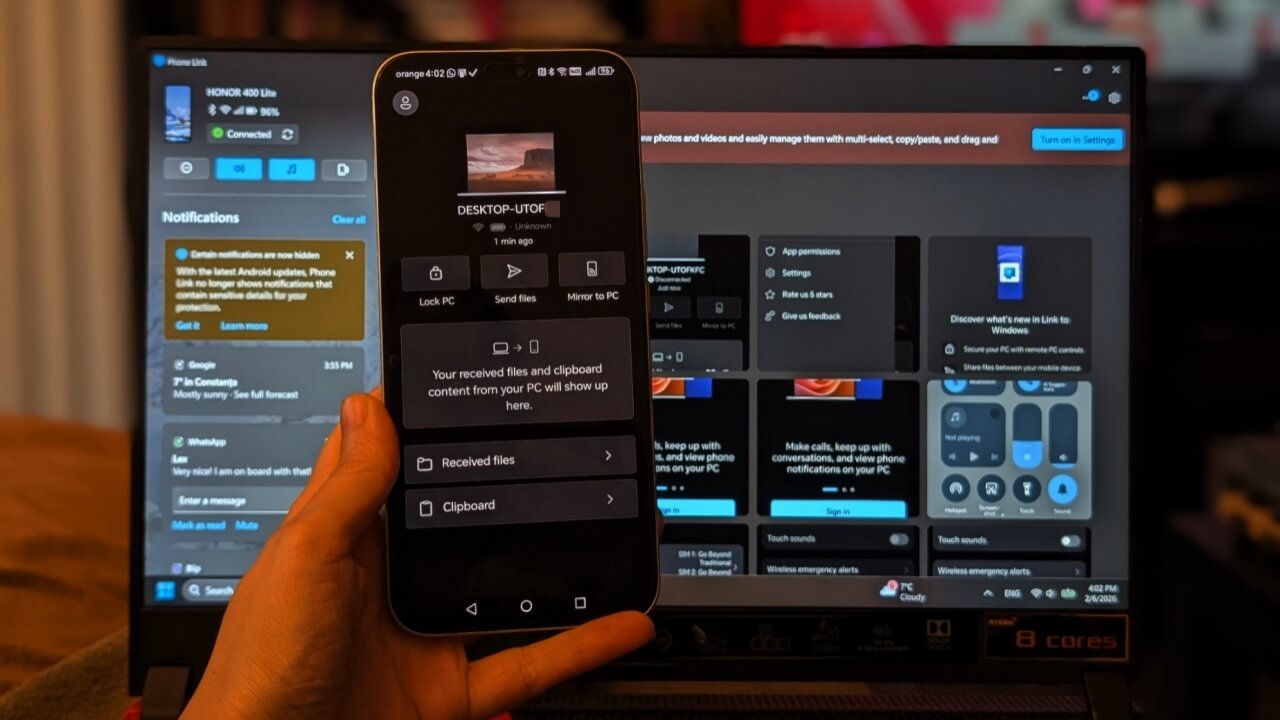
If you’re using a Windows PC and an Android phone, linking the two can significantly streamline your daily workflow. Once connected, you can transfer files between devices, view calls and notifications on your PC, and even lock your computer remotely. Read on to learn how to connect your Windows PC to Android for a more seamless experience.
1. With Phone Link
To get started with the process, first check if you have the Phone Link app on your Windows PC (it should be available by default). If it’s not, you can download it from the Microsoft Store. On your Android device, download and install the Link to Windows app.
Next up, open the Phone Link app on your Windows device and click Get Started. Log in with your Microsoft account. Select whether you want to connect with an Android or an iPhone. Phone Link will now generate a QR code.

Note: if you don’t wish to proceed with a QR code, click Continue without QR code.
Move to the Link to Windows app on your Android phone and also log in with your Microsoft account.
At this point, your Android phone should already attempt to connect to PhoneLink on PC. Make sure you grant the necessary permissions. If you see a message at the top saying “Couldn’t connect your devices,” do this. Tap on the person icon in the upper left corner. Select Add your PC.

On the next screen, tap I see a QR code on my PC to switch to scanning mode. Scan the code on the PC to finally connect the two devices.

Once the two are paired, you can use Phone Link on PC to do the following (after you’ve given the necessary permissions, of course.)
- View notifications
- Send text messages
- View & save photos from your phone
- Transfer files
- Make calls
- View SMS
- View phone stats (such as battery, Wi-Fi/Bluetooth status)
- Mirror phone to PC (available on select Android phones)
- Toggle DND mode on phone
- Play sounds on your phone
- Control music playback
Conversly from your Android phone, you can:
- Send files
- Lock PC
- View PC Clipboard
Note that you can connect multiple Android phones to PhoneLink and you can easily switch between them by going to Settings → Devices and selecting the device in question. You will need to follow the steps above for every device you add to PhoneLink.
Recently Microsoft also added the option to access your phone from the Start menu in Windows, so you can initiate a file transfer or access your messages with a simple click.
2. With a USB Cable
Before apps like Phone Link were a thing, we used to connect our devices with a good old USB cable. If you’re in a hurry and don’t want to waste time setting up apps, your USB cable provides the easy solution.
Just remember to enable the File Transfer on your Android phone, so its contents will actually be visible on your Windows PC. Try these fixes if you’re not seeing the “Charging this device via USB” notification.

Once this is done, your Android phone should appear in the File Explorer sidebar on top of This PC.
3. Give Pushbullet a Try
If you don’t enjoy using PhoneLink or having to rely on a USB cable, there are other apps you can try. For instance, Pushbullet. You will, of course, have to install the app on both your devices first.
Then log in with the same email account on PC and on your Android phone to pair the two devices.

With Pushbullet, you can easily send files between devices, but the app also allows you to view notifications and SMS in the free tier. You can also connect more than one device and even your browser (through the Firefox extension). This is enough for my needs, but if you want something a bit advanced that could give you access to more from your phone, you can try AirDroid Personal or even AirDroid Business.
4. Go for Samsung Flow
For those with a Samsung Galaxy device, your best option for a smooth experience is Samsung Flow. You need to install the app on both your PC and your mobile device.

Connecting is then super easy. Once the two devices are paired, you can view notifications, transfer files, sync your clipboard and mirror your phone’s screen on PC.
The easiest option to connect your Windows PC with Android is by using a USB cable. However, for more control, the first choice should be using Phone Link, since it’s already preinstalled on Windows 11. If you’d rather use something else, we offer suggestions on additional services.
If your goal is solely to transfer files between devices between Windows and Android, then you might want to check out additional methods. This includes Bluetooth which offers a native way of sending files back and forth without you having to install anything else.
Link to Windows
Price: Free
Pushbullet (Desktop)
Price: Free
Pushbullet App
Price: Free
Samsung Flow (Desktop)
Price: Free
Samsung Flow App
Price: Free
