

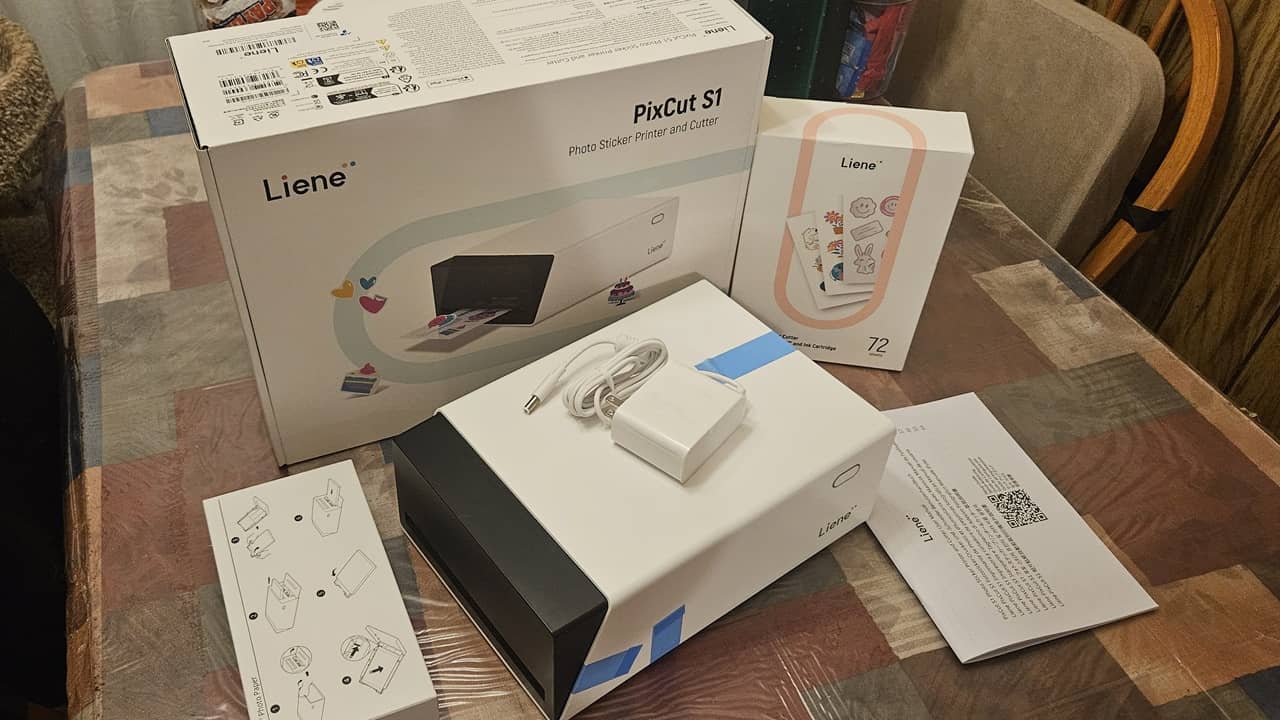
If you have ever used a Polaroid camera to instantly print photos, you know how much having physical photos actually matter. The Liene PixCut S1 Printer mixes that nostalgic vibe with modern printing, letting me print lasting photo memories, along with creative stickers. This review of this unique printer shares my thoughts. Spoiler alert, I love it.
This is a sponsored article and was made possible by Liene. The actual contents and opinions are the sole views of the author, who maintains editorial independence, even when a post is sponsored.
Incredibly Easy Setup and Clear Instructions
As someone who has used numerous printers over the years, I fully expected some complicated setup or issues connecting with the app. The Liene PixCut S1 Printer features two sets of clear instructions: one for the photo printer and one for the sticker printer/cutter.
It’s a simple matter of connecting the power cable, downloading the Liene Photo app, turning the printer on, and following the app prompts for setup. I had the photo paper loaded, the printer set up, and was ready to start printing in under five minutes.

The ink cartridges and paper are easy to load. And the paper tray even tucks back into the printer when you’re done for a more compact design when it’s not in use.

The kit I received included the printer/sticker cutter itself along with the Creator Pack. This includes three ink cartridges (each cartridge prints up to 36 sheets), along with 90 sticker sheets and 18 photo sheets. The Starter Kit is a little cheaper and includes one cartridge, 18 sticker sheets, and 18 photo sheets.

The only downside is that you will need to buy ink and photo/sticker sheets fairly often if you use it frequently. You’ll also need to replace the cutting blade after around 800 sticker pages. But, this is still cheaper than most other options and works significantly faster.
Compact, All-in-One Design
The Liene PixCut S1 is the world’s first smart printing and cutting all-in-one machine designed for home use. No need to buy a photo printer and sticker printer and cutter.
But instead of a bulky machine, the PixCut S1 is just 4.1 x 7.7 x 11 inches and weighs just 6.4 pounds. It works with 4×6-inch photo paper and 4×7-inch photo sticker paper. A small switch in the tray lets you switch between the two.

I also love that you never have to connect the printer to a computer. It works wirelessly via Bluetooth 5.0. Control the designs easily in the phone app for Android and iOS. Wireless connectivity means it’s easy to use nearly anywhere.
Designed to Create Durable, Long-Lasting Prints
Many instant print photo printers and cameras have one major flaw. The ink fades. Whether I print photos or stickers, my memories and creativity are preserved.
The printing process uses four-layer dye sublimation printing. Yes, it may seem a little weird seeing your photos and stickers in varying shades of yellow during the first stage of printing, but trust me when I say the final result is stunning and vivid.
The last stage of printing includes lamination for a waterproof, scratchproof, and fade-resistant finish. No, I didn’t dunk my prints under a running faucet, but I did try scratching with my nails. No marks. Plus, the prints are completely dry as soon as they come out of the printer.

Speaking of results, the Liene PixCut S1 ensures high-quality, vibrant results with 300dpi resolution, support for 16.7 million colors, and a 1280-dot thermal print head. This is as close to professional quality as you could want from the convenience of your own home.
Get Highly Creative With Photos
Want to print single photos? What about collages? Maybe personalized photo cards? As long as it fits on the 4×6 inch sheet, anything goes. The Liene Photo app supports JPEG, PNG, and HEIC file types on your phone. As long as your photos are in one of those formats, you can use them in the app.
The app lets you add up to nine images to a photo collage. Easily zoom in and out of each image to get the perfect collage. Or, upload a selfie and resize for the perfect ID/passport photo.

With built-in AI-powered photo tools, use the app to remove backgrounds, transform yourself into a superhero, turn pet photos into cartoons, and much more. All of this is free in the app.

What I enjoyed was all the templates to inspire more creativity with photos. It’s not just about printing your latest selfie, sunset, or cute kitty pictures. Instead, add fun frames, create a photo wall, turn photos into puzzles, create photo stickers for scrapbooks, and pretty much anything else you can think of.
I created a seasonal collage of nine of my favorite Christmas photos since I received the printer right around the holidays. I also used a photo template to create a collage of my furbabies that’s ready to frame with a colorful background.

Of course, if you loved the classic Polaroid click and print, the Liene PixCut S1 has a similar feature. Use InstaPic mode in the app to snap a photo, use the built-in CCD filters, and instantly print.
Honestly, the hardest part about printing photos is deciding what you want to print and which templates you want to use.
A single sheet takes about one to two minutes at most to print. The app lets you know when the process is finished.
Print and Cut Any Type of Sticker
As someone who often uses stickers in scrapbooks and journals, I couldn’t wait to see how well the Liene PixCut S1 Printer worked for custom stickers. I’m hooked. The AI features are incredible for creating one-of-a-kind stickers of my furbabies. Upload an image, use the AI features to remove the background, or make other edits, and you’re done.
There are thousands of templates and designs to choose from. You aren’t limited to your own photos. I spent far too much time just scrolling through the options. The search box is your best friend to help narrow down results.

The sticker sheets use a residue-free adhesive to let you reposition your stickers. The only downside is this means the adhesive isn’t quite as strong, though I didn’t have any issues with stickers falling off.

I printed several sheets of stickers. I used a mixture of designs, AI tools, and my own photos. It’s easy to resize your stickers in the app to fit as many as you want on a single sheet. The sheet on the right shows an AI image of one of my cats and an AI superhero image from one of my own photos. It also features several of my cats with the backgrounds removed.

I highly suggest using the preview option to ensure each sticker will cut out without connecting to another sticker. I didn’t pay attention during the first preview and two of my stickers ended up connected.

The printer uses AI to automatically determine where to cut. The paper is ultra thin (just 0.08mm), so I was worried it may cut all the way through. The last step of the sticker printing process cuts the stickers perfectly. No cuts through, no trouble removing the stickers later.
Since there is a cutting process, it does take slightly longer than just printing photos, but only around 30 seconds to a minute.
The Liene Photo App Unleashes Endless Creativity
The PixCut S1’s slogan is spot on: Print, Cut, Stick, and Unleash Your Creativity! This couldn’t be more accurate. By having templates, designs, and AI editing tools, anything is possible. You can even save your designs to use again later.
Transform photos with text, extra design elements, and AI watermarks and backgrounds. Create labels, phone case skins, magnets, brand stickers, gift tags, name labels, and so much more.

Turn photos into stylistic stickers with AI styling features. You don’t need any special skills to unleash your creativity and create lasting photo and sticker memories.
Start Printing Memories Today

Quickly edit, customize, and print endless photos and stickers in just minutes. Grab the Liene PixCut S1 Creator’s Kit for just $254 and save 15% with the code PRESS15. Make sure you set aside a weekend just to explore the app and discover everything you can do.
The Liene PixCut S1 and new Pearl series were highlighted at CES 2026. If you’re looking for creativity on the go, keep an eye out for the upcoming Pearl N200 Pro, which allows users to instantly transform everyday snapshots into artistic creations.
